
WhatBreach
Scripts
Is your email part of the huge MOAB data breach? Find out now! This introduces WhatBreach, the OSINT tool to uncover your breach status. Don't wait, watch and check!
POSTS
Is your email part of the huge MOAB data breach? Find out now! This introduces WhatBreach, the OSINT tool to uncover your breach status. Don't wait, watch and check!

The mother of all breaches (MOAB). That’s how security experts refer to the recent discovery of a massive database that is composed of data from thousands of previous breaches, leaks, and private data databases.
But why should I care? How does it impact me?
The breach includes over 26 billion records. That’s staggering. And that means if any of your accounts are included (or if you reuse passwords anywhere), you need to take action to protect yourself and your family.
What Happened? A massive database built from previous breaches, leaks, and private databases across a wide range of business and consumer sites from Twitter and LinkedIn to Adobe and Dropbox has been released by an unknown source. This breach is composed of roughly 26 billion records, and is being referred to as the “mother of all breaches”.
Who’s impacted? The database includes data from a wide variety of commonly used websites, including Tencent, Deezer, Dropbox, and LinkedIn, among others.
How can I tell if I’ve been breached? Cybernews.com has published a personal data leak checker. You can enter your email address to see if it was included in the leak. I didn't add this to the video because I didn't know about it.
Anyone who has an account with these sites, or has reused passwords associated with these sites, should take action immediately. That means resetting passwords and updating login information wherever necessary to protect yourself. If you have a family, don’t forget to check and update any of their passwords as well.
Long term, there are a few things you can do to help prevent this from happening to you in the future. You can:
WhatBreach is an OSINT tool that simplifies the task of discovering what breaches an email address has been discovered in. WhatBreach provides a simple and effective way to search either multiple or a single email address and discover all known breaches that this email has been seen. From there WhatBreach is capable of downloading the database if it is publicly available, downloading the pastes the email was seen in, or searching the domain of the email for further investigation. To perform this task successfully WhatBreach takes advantage of the following websites and/or API's:
Some interesting features of WhatBreach include the following:
You need Git to clone this tool. To install git and configure it, follow the instructions below. It works for both Linux and Termux.
$ sudo apt-get install git
$ git config --global user.name "John Doe"
$ git config --global user.email johndoe@example.com
You need to install Python, visit the Python website to see how to install it
$ sudo apt install pythonStep 1: Open your Terminal
Step 2: Copy and paste the following commands:
$ git clone https://github.com/Ekultek/WhatBreach.gitStep 3: Enter the terminal then install all the requirements using the command below.
$ pip install -r requirements.txtStep 4: If you are using a newer version of Python you would need to change some codes in the file formatter.py, so open that file using the codes below
$ nano /lib/formatter.pyStep 5: Change the raw_input into input
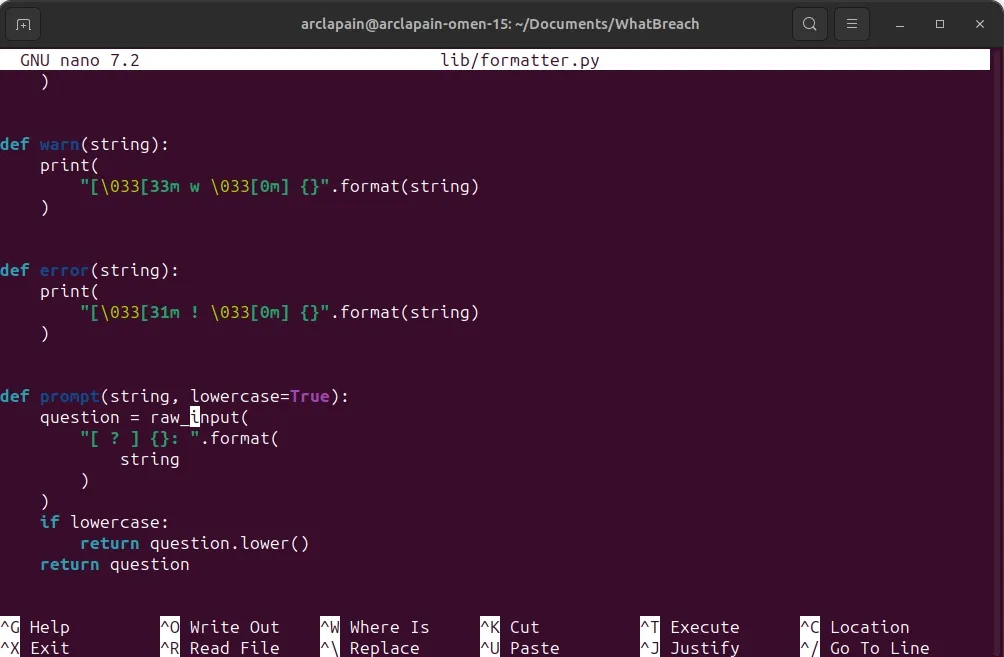
Step 6: Run the script using
$ python whatbreach.py -e example@gmail.comSo that's it, this is a powerful tool I would advise you to use it and also check the other site to see if your data is safe.

Turn your Android device into a powerful Linux workstation. Follow this simple Termux tutorial to learn how to install the app, configure it properly, and start using essential terminal commands in minutes.
Author
Randy Dwomoh
Duration
3 mins

Do you live for mischief? Well then join the club. Learn how to use the Bluetooth Low Energy (BLE) functionality of Android smartphones to create Phantom Bluetooth Advertisements. Let’s create a little mayhem….
Author
Randy Dwomoh
Duration
4 mins

A quick tutorial on turning an Android phone into a portable coding terminal using Termux, Git, and the GitHub CLI to securely manage code and review pull requests on the go.
Author
Llewellyn Paintsil
Duration
3 mins
