Online shopping, stalking crushes, getting banned... Sound familiar? You're leaving a digital footprint! Learn what it is (it's not scary, promise!) and how to peek at it with Infoooze! Stay informed, and stay entertained!
We live in a world where our entire life is basically on the internet, we shop online, watch movies, go on dates, stalk our crushes, get arrested, get banned and the list just goes on. After all these activities we do online, we are leaving behind something huge known as our digital footprint. and in this post, you will learn what a digital footprint is and how to use a very interesting OSINT tool to look up some of that info.
What is a digital footprint?
Whenever you use the internet, you leave behind a trail of information known as your digital footprint. A digital footprint grows in many ways – for example, posting on social media, subscribing to a newsletter, leaving an online review, or shopping online.
Sometimes, it’s not always obvious that you are contributing to your digital footprint. For example, websites can track your activity by installing cookies on your device, and apps can collate your data without you knowing it. Once you allow an organization to access your information, they could sell or share your data with third parties. Worse still, your personal information could be compromised as part of a data breach.
You often hear the terms ‘active’ and ‘passive’ in digital footprints:
Active digital footprints
An active digital footprint is where the user has deliberately shared information about themselves – for example, through posting or participating on social networking sites or online forums. If a user is logged into a website through a registered username or profile, any posts they make form part of their active digital footprint. Other activities that contribute to active digital footprints include completing an online form – such as subscribing to a newsletter – or agreeing to accept cookies on your browser.
Passive digital footprints
A passive digital footprint is created when information is collected about the user without them being aware that this is happening. For example, this occurs when websites collect information about how many times users visit, where they come from, and their IP address. This is a hidden process, which users may not realize is taking place. Other examples of passive footprints include social networking sites and advertisers using your likes, shares, and comments to profile you and target you with specific content.
Why do digital footprints matter?
Digital footprints matter because:
They are relatively permanent, and once the data is public – or even semi-public, as may be the case with Facebook posts - the owner has little control over how others will use it.
A digital footprint can determine a person’s digital reputation, which is now considered as important as their offline reputation.
Employers can check their potential employees’ digital footprints, particularly their social media, before making hiring decisions. Colleges and universities can check their prospective students’ digital footprints before accepting them too.
Words and photos that you post online can be misinterpreted or altered, causing unintentional offence.
Content intended for a private group can spread to a broader circle, potentially damaging relationships and friendships.
Cybercriminals can exploit your digital footprint – using it for purposes such as phishing for account access or creating false identities based on your data.
For these reasons, it is worth considering what your digital footprint says about you. Many people try to manage their digital footprint by being cautious about their online activities to control the data that can be gathered in the first place.
Now we will look at how to use an interesting tool to look up some of your digital footprints, the name of the tool is Infoooze.
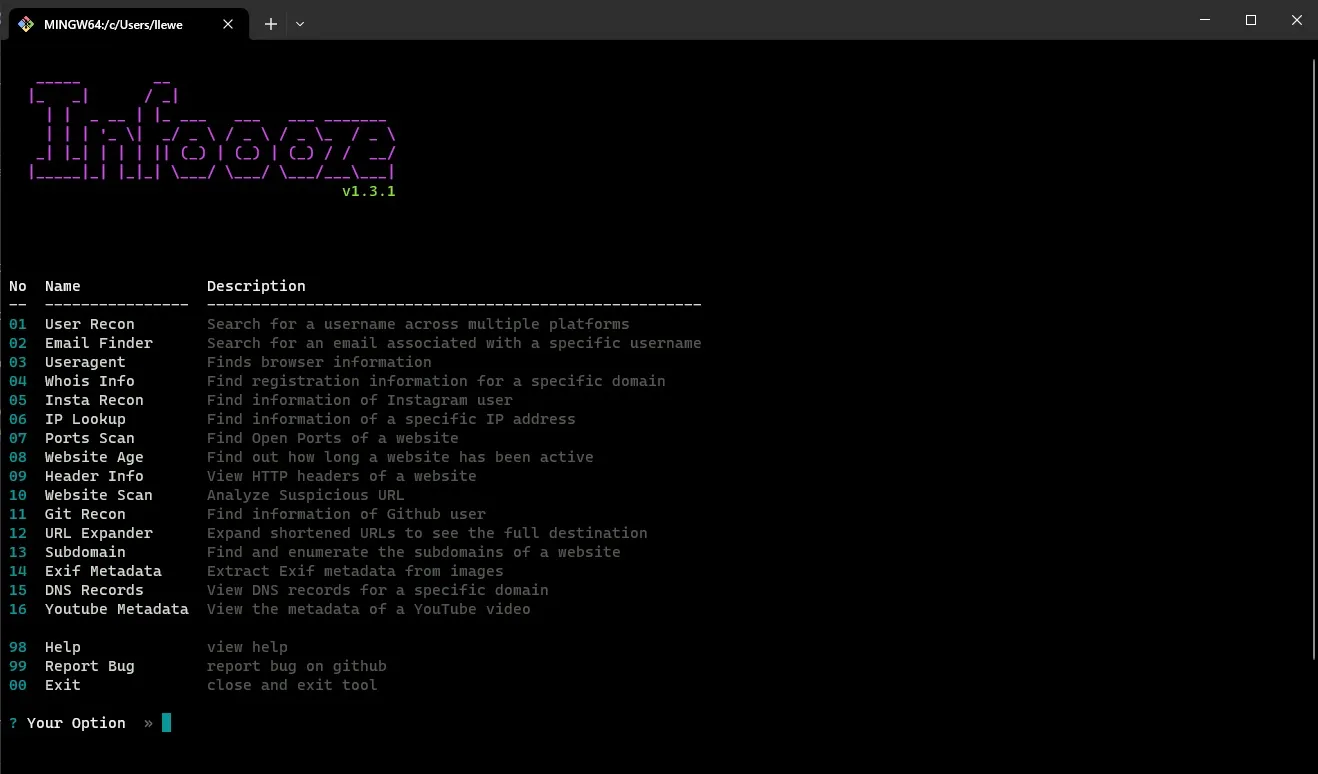
Infoooze is a powerful and user-friendly OSINT (Open-Source Intelligence) tool that allows you to quickly and easily gather information about a specific target. With Infoooze, you can easily search for information about websites, IP addresses, usernames, and more, all from the convenience of a simple command-line interface.
One of the key features of Infoooze is its ability to work as a global package, allowing you to use it from any directory on your computer. It also can automatically save the results of your searches to a text file. This means that you can easily access and refer to the information you have gathered at a later time.
Infoooze is easy to install and use, making it an ideal tool for anyone looking to gather information quickly and efficiently.
Features
Instagram Recon
Subdomain Scanner
Ports Scan
User Recon
Mail finder
URL Scanner
Exif metadata
Whois Lookup
IP Lookup
Header Info
Website Age
DNS Lookup
UserAgent Lookup
Git Recon
URL Expander
Youtube Lookup
Instagram DP Viwer
Save Results to file
This tool has a whole lot of tools and I use the DNS lookup just to be safe when I'm looking at some sites.
Installation and Setup
Prerequisites:
You need NodeJs 12 or later to run this tool.
To install Node.js, follow the instructions for your operating system:
Follow the prompts in the installer (Accept the license agreement, click the NEXT button a bunch of times and accept the default installation settings).
Restart your computer. You won't be able to run Node.js until you restart your computer.
Linux:
Step 1: Open your Terminal
Step 2: Copy and paste the following commands:
sudo npm install -g -s infoooze
Step 3: Run the tool using the infoooze command then select the tool you want to use.
Step 4: Enjoy yourself
Android:
Step 1: Make sure your device is Android 8 or above.
Driven by a transformative moment that sparked a deep fascination with technology, I've been captivated by all its facets, particularly the visual aspects of software and video.
Learn how to seamlessly mirror your Android device to your PC using Scrcpy over wireless debugging, plus an introduction to a custom tool to make the connection process effortless.
Turn your Android device into a powerful Linux workstation. Follow this simple Termux tutorial to learn how to install the app, configure it properly, and start using essential terminal commands in minutes.