Go Back

POSTS

How to set up pop os bootloader (systemd-boot)

Unlock seamless dual-booting! Tired of the boot menu guessing game? This quick guide gives you a clean, clear menu to switch between Windows and Pop!_OS like magic. Level up your dual-boot game!

Author:

Llewellyn Paintsil

Date:

Read:

2 mins

Linux

how-to-set-up-pop-os-bootloader-systemd-boot-thumbnail

You just managed to dual boot Windows and pop os, congrats, now you wanna set up a menu so you can switch between your Windows and pop os with ease. in this video, I'll be showing you how to do just that. Well, this isn't that video but here we go.
STEPS

  • Open up your terminal.
opened terminal
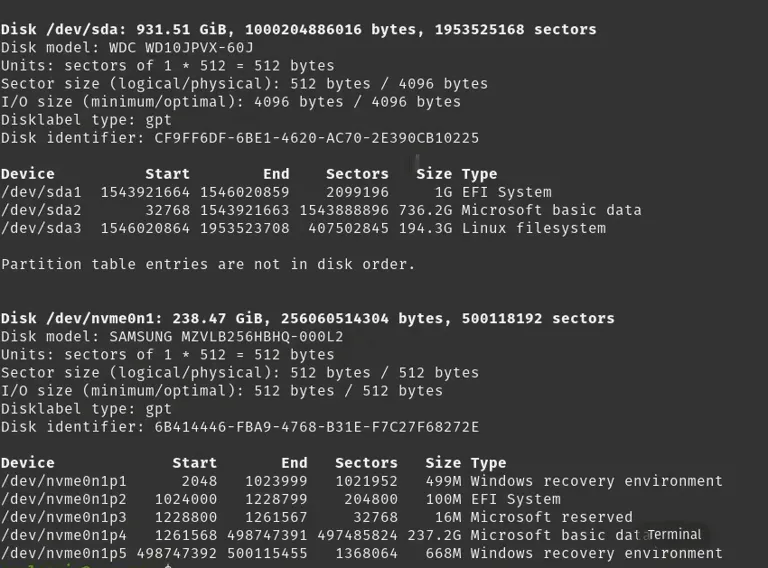
  • Time to list all the partitions you have. To do that just type the following command.

$ sudo fdisk -l

sudo fdisk -l result
  • What you are looking for is a partition with your windows. If you are like me, you have installed your pop os in your HDD while the Windows stays on your SSD, so what you will be looking for is your EFI partition.
partition to look for
  • After you are done locating your windows EFI partition make a folder where you would be mounting your windows partition.

$ sudo mkdir /mnt/windows

  • After you are done creating your partition, let's mount your windows partition.

$ sudo mount /dev/{YOUR WINDOWS EFI SYSTEM PARTITION DEVICE} /mnt/windows

  • Example - $ sudo mount /dev/nvme0n1p2 /mnt/windows

  • Now time to copy your windows boot files into your boot folder.

$ sudo cp -r /mnt/windows/EFI/Microsoft /boot/efi/EFI

  • So one thing you need to get as a habit is always testing to see if what you are doing is working before you continue. so let's do that before we move on.

$ sudo ls /boot/efi/EFI

  • You should see a Microsoft folder if what you have done so far has worked.
result from sudo ls /boot/efi/EFI
  • OK time to configure some files so your bootloader will start showing on boot up. you would need to configure this file.

$ sudo nano /boot/efi/loader/loader.conf

  • input this code in your editor, on the next line.

timeout 60s

console-mode max

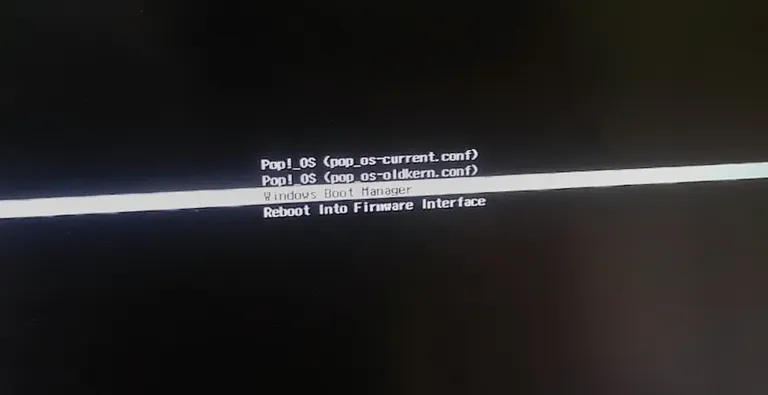
  • save and restart your machine. If everything was successful you should see this screen.
pop os boot selection screen
  • if everything is done then you are good to go. Thank you and don't forget to subscribe.

Author

Llewellyn Paintsil profile pic, a member of L.A.P

Llewellyn Paintsil

Driven by a transformative moment that sparked a deep fascination with technology, I've been captivated by all its facets, particularly the visual aspects of software and video.

Latest Posts

Tutorial

How to Fix Corrupted Video Files thumbnail

How to Fix Corrupted Video Files

Did your PC crash mid recording? Don't delete that corrupted file. This guide explains exactly how to restore broken recordings and fix audio sync issues using free tools like Untrunc and FFmpeg.

Author

Llewellyn Paintsil

Duration

5 mins

Tutorial

Read Every Manga (For Free) with Komikku thumbnail

Read Every Manga (For Free) with Komikku

Tired of reading manga on websites that drain your battery and spam you with ads? There’s a better way. Meet Komikku: the clean, ad-free, and open-source alternative that every manga fan needs. Here is exactly how to set it up and start reading in minutes.

Author

Llewellyn Paintsil

Duration

6 mins

Tutorial

Turn Your Phone Into a Magic Wand thumbnail

Turn Your Phone Into a Magic Wand

Too lazy to reach for the mouse? Discover how to use your phone's gyroscope to control your computer from a distance in this quick, beginner-friendly guide.

Author

Llewellyn Paintsil

Duration

5 min